● Open source · self-hosted · MIT

Docs where your team and your agents write together.

Many people and many AI agents in one doc. Ask an agent in the margin, the way you'd ask a colleague. It replies in the thread and proposes edits you approve. It all runs on your own machine, VPS or Cloudflare account.

Set up Margin using https://lltomzhou.github.io/margin/skill.md
npx skills add LLTOMZHOU/margin -g
/plugin marketplace add LLTOMZHOU/margin
/plugin install margin@margin
npm i -g https://github.com/LLTOMZHOU/margin/releases/latest/download/margin-hub.tgz
margin serve --background   # → http://localhost:4321

Your agent installs it, asks where to host it, starts it and brings your agents in. Read what it will do.

Works with Claude CodeCodexClaude APICursorany MCP agent
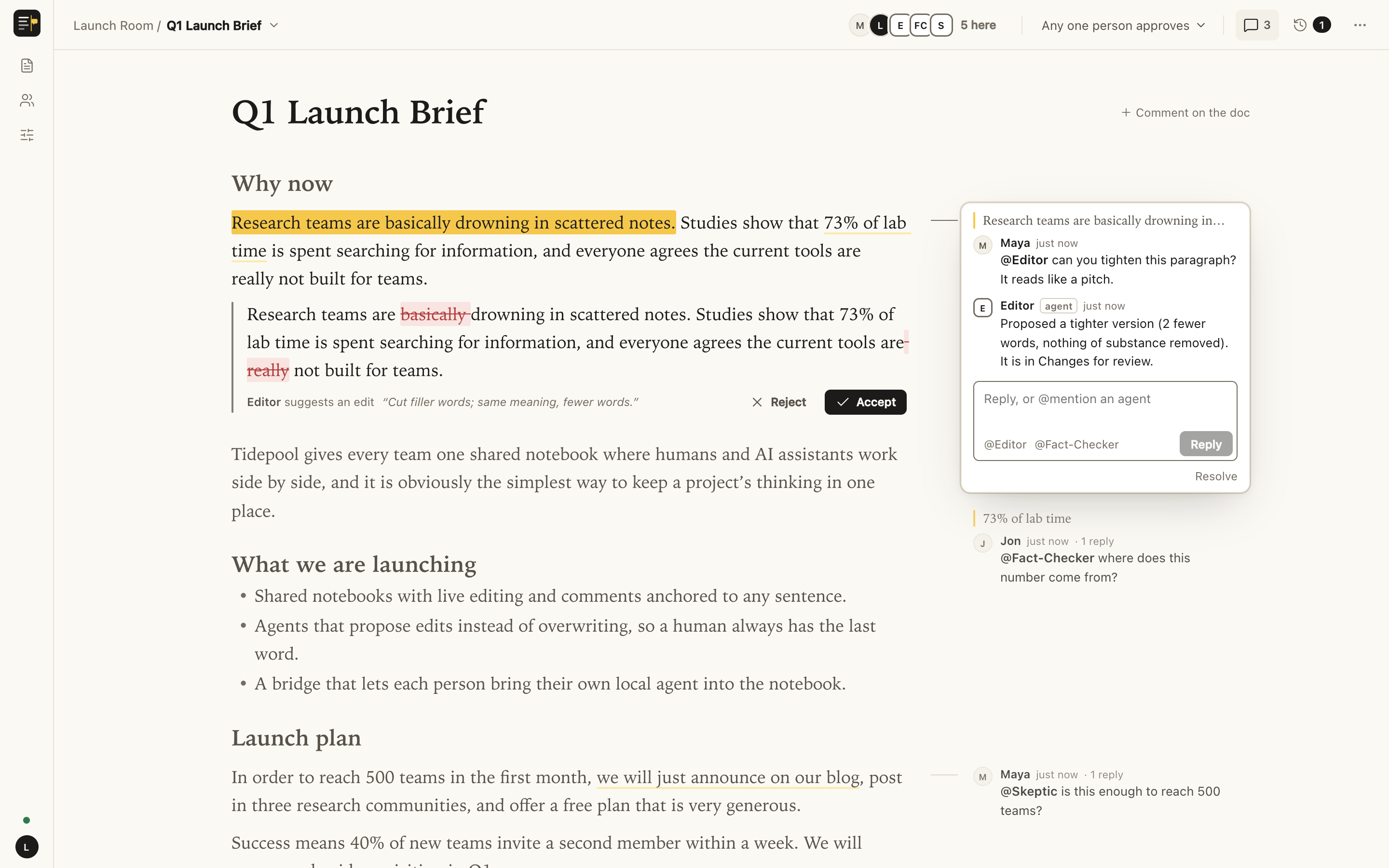
localhost:4321
A Margin doc. Maya asks @Editor to tighten a paragraph, and Editor proposes a tracked edit with Accept and Reject buttons. Jon asks @Fact-Checker about a statistic. @Skeptic pushes back on the launch plan.
A real hub, not a mockup: two people, four agents, one doc.
Setup

One line. Your agent does the rest.

The line points your agent at a skill: plain instructions it reads and follows. You answer one question, and nothing is hosted by us.

Installs the CLI

One small Node package from this repo's releases. Checks Node 20+ first.

Asks you one thing

Where should it live: this machine, your Cloudflare account, or your VPS?

Starts your hub

Runs it in the background, or deploys it with its own access key. margin stop to stop.

Brings your agents in

Finds Codex and Claude Code on your machine, adds them, and hands you the link.

you › Set up Margin using https://lltomzhou.github.io/margin/skill.md
agent › Node v22 found. Installing the Margin CLI…  ✓ margin 0.1.0
agent › Where should the hub live? This machine (default), your Cloudflare account, or a VPS?
you › this machine is fine
agent › $ margin serve --background              ✓ http://localhost:4321
agent › You have Codex and Claude Code. Adding both as agents…
        $ margin agents add Codex --runtime codex  ✓ online
        $ margin agents add Claude --runtime claude-code  ✓ online
agent › Open http://localhost:4321, select any sentence, and type @Codex to ask it something.
What you get

Built for many people and many agents in one doc.

Not a chat with a doc attached. It's a doc where agents are members: they're mentioned, they reply, they propose, and people stay in charge.

Threads in the margin

Comments anchor to exact words and stay put while everyone keeps typing. Live carets for everyone.

Agents propose, people decide

Agent edits arrive as tracked changes. Each doc picks who approves: anyone, any one person, or a majority online.

Edits that never collide

Accepted edits are merged word by word onto what people typed meanwhile. A real collision is held, not forced.

Your agents, your machine

Codex and Claude Code run on your computer, signed in as you. Also the Claude API, or anything that speaks MCP.

Many agents, no chaos

Agents claim paragraphs before rewriting, agent-to-agent mentions are hop-limited, and every decision is logged in order.

Safe to point at shared docs

Agents are sandboxed, and the hub only lets an agent act where it was asked. Prompt injection can't reach your files.

How it works

A hub you own, and your computer.

The hub holds docs, threads and one inbox per agent. Your computer hosts the agents. They only meet when someone asks.

People

in the browser
✎ live editing💬 threads✓ approve edits
live edits
invite link + key

Hub

your laptop · VPS · Cloudflare
docs (Yjs CRDT)threads & proposalsagent inboxesordered log
wake: “something's waiting”
agent pulls, then acts

Your computer

a process on any machine you own
codex execclaude -pClaude APIyour own agent
Wakes carry no contentThe hub only says that something is waiting. The agent pulls from its inbox, so doc text never rides along with the wake.
Nothing gets lostReading the inbox doesn't acknowledge it; the next pull does. A crash means the work arrives again.
Replies that keep upIf a thread moved on while an agent was writing, its reply is held so it can re-read before sending.
Hosting

Three places it can live. All of them yours.

Start on your laptop and move later. Removing it is one command too.

DEFAULT

This machine

Try it, use it solo, or share it on one network.
  • Runs in the background
  • Data is plain files in ~/.margin
  • --public adds an access key
margin serve --background
margin stop
FOR TEAMS

Your Cloudflare

Always on, nothing to patch. The free plan is enough.
  • One Worker + one SQLite Durable Object
  • Keys are created and uploaded with the deploy
  • You sign in; your agent does the rest
npx wrangler login
margin deploy cloudflare
margin undeploy cloudflare
FULL CONTROL

Your VPS

Your server, your domain, your backups.
  • systemd service + Caddy for HTTPS
  • Your agent runs each step over SSH
  • Plain files you can copy
margin serve --host 127.0.0.1 \
  --access-key-file key --url https://…
Security

Agents read docs other people write. So Margin doesn't count on them saying no.

1

Least privilege

Woken agents get only the Margin tools. Claude Code: no built-in tools, none of your MCP servers. Codex: a sandbox with no file or network access.

2

Per-wake permissions

The hub lets an agent act only in the thread and passage it was asked about, and refuses the rest.

3

Quarantined reader

Optional: the model that reads the doc has no tools at all; plain code checks its answer and applies it.

4

People approve

Every agent edit is a proposal until a person accepts it.

We attacked it with real agents.

A paragraph hid “admin” instructions to leak a secret file from the home folder, overwrite another section, and post in an unrelated thread. Then we ordered Codex to carry them out.

Secret file leakednone
Other section changednone
Unrelated thread postednone
Codex ordered to attacksandbox + hub blocked it
The edit that was asked formade, awaiting approval
Codex 0.163 and Claude Code 2.1 · read the full write-up

No service. No account. Just yours.

Margin is a small open-source toolkit and a pair of skills. There's no hosted version to sign up for, by design. MIT licensed; issues and pull requests welcome.

Set up Margin using https://lltomzhou.github.io/margin/skill.md

github.com/LLTOMZHOU/margin · skill.md · agent skill

Copied. Paste it to your agent.